
Google Traffic Rank: What It Means and How to Measure It
The phrase “Google traffic rank” can refer to several different things: a website’s position in Google search results, the amount of traffic it receives from Google, or a ranking score provided by a third-party analytics service. These measures are related, but they are not interchangeable. Understanding the difference can help you evaluate a website’s search performance and choose the right way to track progress.
Does Google provide a traffic rank?
Google does not publish a single, official traffic rank that orders every website by the number of visitors it receives. Google Search results are ranked for individual searches, not according to one universal list of websites. A site may appear near the top for one query and much lower—or not at all—for another.
Google also provides tools that report data about a site, but these do not assign it a universal traffic rank. Google Search Console shows information about a verified website’s performance in Google Search, while Google Analytics can measure activity on a site when analytics tracking is properly configured.
Three meanings people often confuse
Search ranking
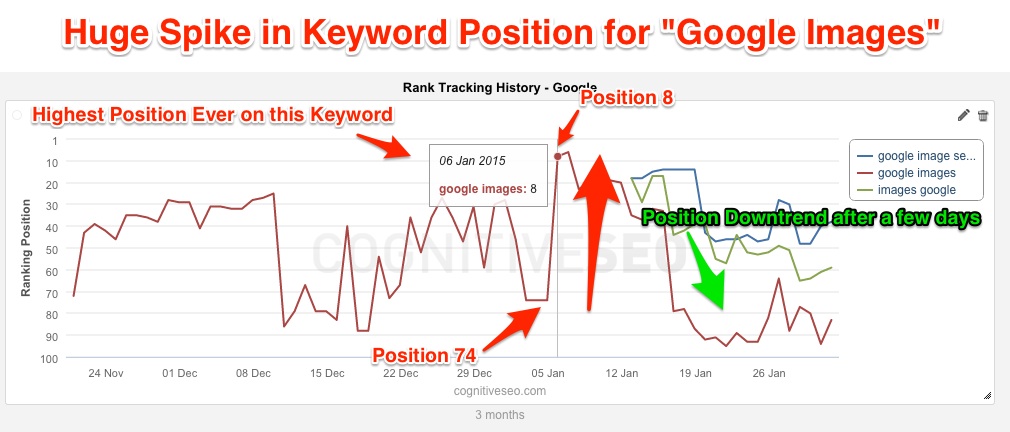
A search ranking is a page’s position on the results page for a particular query, location, device, and time. For example, a page might rank highly for a specific product name but not for a broad category term. Search positions can change as Google updates its results and as competitors publish or improve their content.
Google organic traffic
Organic traffic from Google is the number of visits that arrive after someone clicks an unpaid Google Search result. This is a traffic measurement, not a rank. A page’s traffic can be influenced by its search positions, the number of people searching for its topic, and how often searchers choose its result.
Third-party website rank
Some marketing platforms estimate website popularity and assign sites a score or position. These figures can be useful for comparing websites within the same tool, but they are not official Google rankings. Different providers use different data sources and methods, so their estimates may vary.
How to check your Google Search performance
For a website you manage, Google Search Console is a useful starting point. Its performance reports can show impressions, clicks, click-through rate, and average position for queries and pages. Average position is a summary across the reported results; it does not mean that a page holds one fixed position for every searcher.
To understand what happens after visitors arrive, use an analytics tool such as Google Analytics. Analytics can help measure visits, engagement, conversions, and other on-site activity, depending on how the site is configured and how users consent to data collection.
Why rankings and traffic change
Search visibility can shift for many reasons, including changes in search algorithms, competitor activity, seasonality, technical problems, and updates to a page’s content. Search results may also differ based on a person’s location, language, device, and search context. Because of these factors, a single ranking check is only a snapshot.
Traffic can change even when rankings remain similar. Search demand may rise or fall, a result may receive a different click-through rate, or Google may display features such as maps, images, or answer panels that affect how people interact with the results page.
How to improve search traffic responsibly
- Create accurate, useful content that addresses what your audience is trying to learn or accomplish.
- Use clear page titles and headings that describe the content without misleading readers.
- Make important pages easy for people and search engines to find through logical navigation and relevant internal links.
- Ensure the site works well on mobile devices and loads reliably.
- Fix technical issues that prevent pages from being crawled, indexed, or used effectively.
- Review Search Console and analytics data over time rather than reacting to a single fluctuation.
Choose the right metric
If you want to know where a page appears in Google Search, look at query-level search performance. If you want to know how many visits come from Google, measure organic traffic. If you are comparing a site with competitors, a third-party estimate may offer context, but treat it as an approximation rather than an official Google score.
There is no one number that fully describes a website’s success in Google. A clearer picture comes from combining search visibility, qualified traffic, and meaningful outcomes such as leads, sales, or reader engagement.
Google Traffic Rank: 9 FAQs About Rankings, Traffic, and Tracking
- What is Google traffic rank?
- Does Google provide an official traffic rank for websites?
- How can I check my website’s Google search ranking?
- How can I find out how much traffic my website gets from Google?
- What is the difference between Google traffic and Google search ranking?
- Why does my website’s Google ranking change?
- How often should I check my Google rankings and traffic?
- Can third-party tools accurately estimate a website’s Google traffic rank?
- How can I improve my website’s rankings and organic traffic on Google?
What is Google traffic rank?
Google traffic rank is a term people use to describe how popular a website is or how well it performs in Google Search, but Google does not publish one official ranking that orders all websites by traffic. Search position is specific to a query and can vary by location, device, and time, while Google organic traffic measures visits from unpaid search results. Google Search Console can help site owners review impressions, clicks, and average position, and analytics tools can measure visits after people arrive.
Does Google provide an official traffic rank for websites?
No. Google does not provide an official traffic rank that orders all websites by visitor numbers. Instead, Google Search Console reports search performance for sites you manage, including impressions, clicks, and average position, while Google Analytics can measure visits when it is set up on your site. Third-party services may estimate website traffic or popularity, but their rankings are not official Google metrics.
How can I check my website’s Google search ranking?
To check your website’s Google search ranking, use Google Search Console’s Performance report. It shows the search queries that brought people to your site, along with impressions, clicks, click-through rate, and average position. Keep in mind that rankings can vary by query, location, device, and time, so there is no single position that applies to every search. For a quick spot check, search for a specific phrase in Google, but use Search Console to track trends more reliably.
How can I find out how much traffic my website gets from Google?
To find out how much traffic your website gets from Google Search, verify your site in Google Search Console and review the Performance report, which shows clicks, impressions, click-through rate, and average search position. To measure visits and what people do after arriving, use an analytics tool such as Google Analytics, making sure it’s set up correctly. Search Console tracks activity in Google Search, while analytics tracks activity on your website, so using both gives you a more complete picture.
What is the difference between Google traffic and Google search ranking?
Google traffic is the number of visits your website receives from Google, usually through clicks on unpaid search results. Google search ranking is the position a specific page appears in for a particular search query. Rankings can influence traffic, but they are not the same: a high-ranking page may receive few visits if few people search for that topic or click its result, while a lower-ranked page may still attract visitors for less competitive queries.
Why does my website’s Google ranking change?
Your website’s Google ranking can change because search results are continually updated and may vary by search query, location, device, and user context. Changes in Google’s systems, competitors’ content, your page’s relevance or quality, and technical issues—such as slow loading or indexing problems—can also affect where your pages appear. A ranking shift doesn’t always mean something is wrong; monitor performance over time in Google Search Console and focus on providing useful, accurate content and a reliable site experience.
How often should I check my Google rankings and traffic?
Check your Google rankings and traffic regularly, but avoid reacting to every daily fluctuation. For most websites, reviewing Google Search Console and analytics once a week is enough to spot significant changes, while a monthly review can reveal longer-term trends in impressions, clicks, organic visits, and conversions. After a major site update or marketing campaign, check more often to catch issues early. Compare similar time periods, since seasonality and changes in search demand can affect results, and remember that rankings vary by query, location, and device.
Can third-party tools accurately estimate a website’s Google traffic rank?
Third-party tools can provide useful estimates of a website’s Google traffic, search visibility, or relative popularity, but they cannot report an official Google traffic rank—Google does not publish one universal ranking for websites. These tools rely on their own data sources and estimation methods, so results can differ from one provider to another and from a site’s actual analytics. Use them to compare trends or competitors, and verify your own search performance with Google Search Console and your actual visits with an analytics tool.
How can I improve my website’s rankings and organic traffic on Google?
To improve your website’s Google rankings and organic traffic, publish helpful, original content that clearly answers your audience’s questions, and organize it with descriptive titles, headings, and relevant internal links. Make sure your site is mobile-friendly, fast, secure, and easy for search engines to crawl. Research the terms your audience uses, but incorporate them naturally rather than stuffing keywords. Use Google Search Console to identify pages with impressions but few clicks, technical issues, and opportunities to improve, then track results over time. Focus on earning relevant, trustworthy links and improving the experience for visitors; rankings can take time and are never guaranteed.