
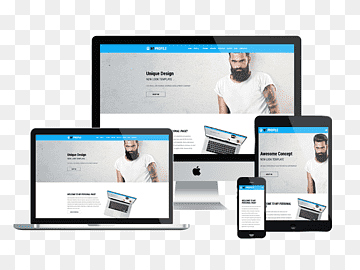
Responsive Web Design Template: Creating a Seamless User Experience Across Devices
In today’s digital age, having a responsive web design is crucial for ensuring that your website looks and functions seamlessly across different devices. A responsive web design template is a pre-designed layout that adapts to the screen size and resolution of the device being used to access it. This ensures that users have a consistent and user-friendly experience, whether they are viewing your site on a desktop computer, tablet, or smartphone.
One of the key advantages of using a responsive web design template is that it eliminates the need to create multiple versions of your website for different devices. Instead, the template automatically adjusts the layout, font sizes, images, and other elements to fit the screen size of the device. This not only saves time and effort but also ensures that your website is accessible to a wider audience.
When designing a responsive web design template, it is important to consider factors such as navigation menus, image sizes, and text readability. Navigation menus should be easy to use on both desktop and mobile devices, with clear labels and intuitive placement. Images should be optimized for fast loading times without compromising quality, and text should be legible without requiring zooming in on smaller screens.
Using HTML5 and CSS3 coding techniques can help create a responsive web design template that is flexible and adaptable. Media queries can be used to define different styles for different screen sizes, while fluid grids can ensure that content adjusts proportionally to fit various screen widths.
Overall, investing in a responsive web design template is essential for creating a positive user experience and improving your website’s accessibility across devices. By implementing best practices in responsive design, you can ensure that your website remains engaging and functional no matter how users choose to access it.
Understanding Responsive Web Design Templates: Key Questions and Insights
- What is a responsive web design template?
- Why is a responsive web design template important for websites?
- How does a responsive web design template work?
- What are the key features of a good responsive web design template?
- How can I customize a responsive web design template to fit my brand?
- Are there any common challenges or issues when using a responsive web design template?
What is a responsive web design template?
A responsive web design template is a pre-designed layout that automatically adjusts its appearance and functionality based on the screen size and resolution of the device being used to view it. This means that a responsive web design template ensures that a website looks and functions optimally on desktop computers, laptops, tablets, and smartphones without requiring separate versions for each device. By utilizing flexible grids, fluid images, and media queries in the coding, a responsive web design template provides a seamless user experience across various devices, ultimately improving accessibility and usability for website visitors.
Why is a responsive web design template important for websites?
A responsive web design template is crucial for websites because it ensures a seamless user experience across various devices. With the increasing use of smartphones and tablets to access the internet, having a website that automatically adjusts to different screen sizes is essential for reaching a wider audience. A responsive design not only improves accessibility but also enhances user engagement and satisfaction by providing a consistent look and feel regardless of the device being used. Additionally, search engines like Google prioritize mobile-friendly websites in their rankings, making a responsive web design template vital for improving SEO performance and driving organic traffic to your site.
How does a responsive web design template work?
A responsive web design template works by utilizing flexible grids and layouts that automatically adjust and adapt to the screen size and resolution of the device being used to access the website. This adaptive approach ensures that the content, images, and overall design elements reflow and resize seamlessly to provide an optimized viewing experience across various devices, such as desktop computers, tablets, and smartphones. By incorporating CSS media queries and fluid grids, a responsive web design template can dynamically rearrange content and adjust styling based on the specific characteristics of the user’s device, resulting in a consistent and user-friendly presentation regardless of screen size.
What are the key features of a good responsive web design template?
A good responsive web design template should have key features that ensure a seamless user experience across devices. These features include a flexible layout that adjusts to different screen sizes, ensuring that content is displayed appropriately on desktops, tablets, and smartphones. Clear and intuitive navigation menus are essential for easy browsing on all devices. Images should be optimized for quick loading times without sacrificing quality, and text should be legible without requiring zooming in on smaller screens. Additionally, a good responsive web design template should prioritize mobile responsiveness, with touch-friendly elements and a focus on performance optimization for mobile users. By incorporating these key features, a responsive web design template can provide users with a consistent and user-friendly experience regardless of the device they are using.
How can I customize a responsive web design template to fit my brand?
Customizing a responsive web design template to align with your brand involves several key steps. Begin by incorporating your brand colors, logo, and typography into the template’s design elements. This can be achieved by updating the CSS styles to reflect your brand’s color palette and fonts. Additionally, customize images and graphics to feature your brand imagery and messaging. Ensure that the layout remains cohesive with your brand identity while maintaining responsiveness across various devices. By personalizing the template with unique branding elements, you can create a tailored and cohesive online presence that reflects your brand values and resonates with your target audience.
Are there any common challenges or issues when using a responsive web design template?
When using a responsive web design template, there are several common challenges and issues that designers may encounter. One challenge is ensuring consistent design and layout across different devices, as elements may shift or stack differently on smaller screens. Another issue is optimizing images and multimedia content for various screen sizes without sacrificing quality or loading times. Additionally, navigation menus and interactive elements may require special attention to ensure usability on both desktop and mobile devices. It is important to test the responsive web design template thoroughly across different devices and browsers to identify and address any compatibility issues that may arise. By staying vigilant and proactive in addressing these challenges, designers can create a seamless and user-friendly experience for visitors across all devices.