
How to Find Your Website Ranking
Knowing where your website appears in search results can help you understand how people discover your business and whether your SEO efforts are working. Your website may rank differently for each search term, location, device, and search engine, so there is no single ranking that tells the whole story. Here are practical ways to check your positions and make sense of the results.
Check Google Search Console
Google Search Console is a free tool that shows how your site performs in Google Search. After verifying that you own the website, open the Performance report and review metrics such as:
- Clicks: How many people clicked your pages in search results.
- Impressions: How often your pages appeared in search results.
- Average position: The average ranking position for your results across the selected dates, queries, and pages.
- Queries: The search terms that displayed your website.
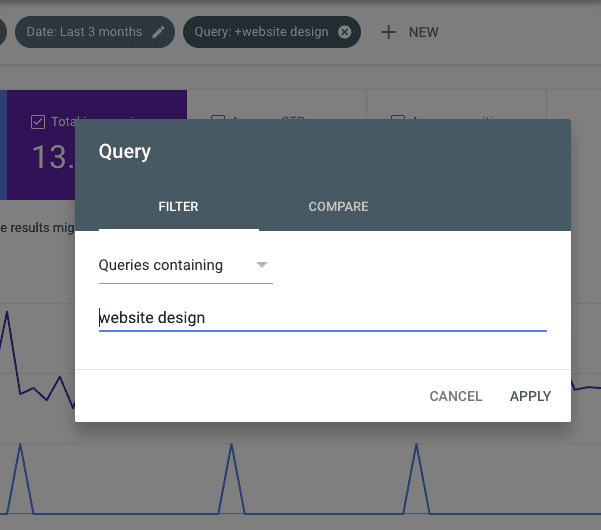
Use the report’s filters to examine a particular query, page, country, or date range. Average position is useful for spotting trends, but it is not a fixed rank. A page can appear in different positions for different searches or users.
Use a Rank-Tracking Tool
SEO platforms can track selected keywords over time. These tools typically let you choose a search engine, location, and device type, then record your website’s position at regular intervals. This makes it easier to see whether a page is gaining or losing visibility.
When comparing tools, look for clear settings for location and device, historical data, competitor comparisons, and alerts for significant changes. Keep in mind that rank-tracking results are estimates and may not exactly match what every person sees.
Search Manually—with Caution
You can search for a keyword in a browser to get a quick impression of where your website appears. However, this is not a reliable way to measure rankings. Search results can vary based on your location, search history, device, language, and other factors. A result you see may not be the same one another person sees.
If you do a manual check, use a private browsing window and note your location and device. Treat the result as a quick reference, not a definitive ranking report.
Check Rankings for Specific Keywords
Before checking your position, make a list of relevant search terms. Include the phrases people might use when looking for your products, services, or information. A useful keyword list can include:
- Your main products or services
- Questions your customers commonly ask
- Location-based searches, such as “plumber in Austin”
- More specific phrases that describe a particular need
Check which page appears for each query. The page ranking for a keyword may not be your homepage; it could be a service page, product page, or article.
Review Local Search Visibility
If your business serves a specific area, check local search results as well as standard organic rankings. Local results can depend heavily on the searcher’s location and may include map listings. Keep your business name, address, phone number, hours, and service details accurate across your website and business listings.
For local searches, track the areas that matter to your business rather than relying on a single search from one location.
How to Interpret Your Website Ranking
A ranking is one measure of search visibility, but it does not tell you everything about performance. A page in a prominent position may receive few clicks if its title and description do not match what searchers want. A page in a lower position may still bring valuable visitors for a highly relevant search.
Review rankings alongside impressions, clicks, click-through rate, conversions, and the quality of the traffic. Also compare performance over time. Small daily changes are normal; longer-term patterns are usually more meaningful.
What to Do If Your Rankings Are Low
If an important page is not ranking as well as you hoped, start with the basics:
- Make sure the page is accessible to search engines and is not blocked from indexing.
- Write useful, original content that directly addresses the searcher’s needs.
- Use a clear page title and heading that describe the topic accurately.
- Improve page speed, mobile usability, and overall navigation.
- Link to the page from relevant sections of your website.
- Check that the page targets a suitable search term and does not compete unnecessarily with another page on your site.
SEO improvements can take time to appear in search results. Make changes carefully, track the results, and avoid judging progress based on a single ranking check.
Find Your Website Ranking and Track Progress
The best way to find your website ranking is to combine Google Search Console data with a rank-tracking tool and a clear list of target keywords. Check rankings consistently under comparable conditions, then use clicks, traffic, and conversions to understand whether your visibility is bringing real value. This gives you a more useful picture than relying on one search result or one ranking number.
5 Tips to Check Your Website’s Search Rankings
- Check Google Search Console for your average search position.
- Search your target keywords in a private browser window.
- Use an SEO tool to compare rankings across keywords.
- Set the correct country and location when checking results.
- Track rankings regularly to spot changes over time.
Check Google Search Console for your average search position.
Check Google Search Console to see your website’s average search position in Google results. In the Performance report, review the “Average position” metric and filter by search query or page to get more specific insights. Because this is an average across searches, locations, and devices, it may differ from the position you see in a single search. Track it over time to spot broader ranking trends.
Search your target keywords in a private browser window.
Search your target keywords in a private browser window for a quick look at where your website appears in search results. Private browsing can reduce the influence of your search history, but it does not make results completely neutral—location, device, and other settings may still affect what you see. Treat this check as a rough snapshot, and use a rank-tracking tool or Google Search Console to monitor performance more reliably.
Use an SEO tool to compare rankings across keywords.
Use an SEO tool to compare your website’s rankings across multiple keywords in one place. These tools can show which search terms are gaining visibility, which pages appear in results, and how your positions change over time. Compare keywords that match your products, services, and audience, and review the data regularly to spot opportunities for improvement. Keep location and device settings consistent so your comparisons are more meaningful.
Set the correct country and location when checking results.
Set the correct country and location when checking your website rankings, because search engines often tailor results to where a person is searching from. A business may rank well in one city or country but appear much lower elsewhere, especially for local searches. Choose the location of your target audience in your rank-tracking tool, and keep that setting consistent each time you check so you can compare results accurately.
Track rankings regularly to spot changes over time.
Track your website rankings regularly to see how your pages perform over time. Checking at consistent intervals can help you spot meaningful changes, identify pages or keywords gaining visibility, and notice potential declines before they become bigger issues. Compare results across similar dates, locations, and devices, and consider rankings alongside clicks and website traffic for a clearer picture of your SEO progress.