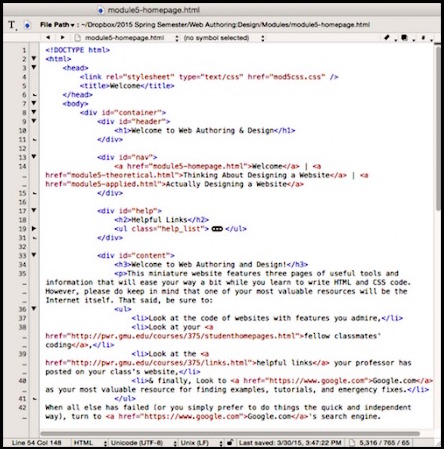
. These elements help organize the content on the page and make it easier for users to find what they’re looking for.
In terms of styling, CSS plays a crucial role in defining the visual appearance of your home page. You can use CSS properties like color, font-size, padding, margin, and background to customize the look of your elements. Additionally, you can use CSS frameworks like Bootstrap or Foundation to streamline the design process and ensure your home page looks professional across different devices.
When designing a home page, consider incorporating eye-catching graphics, clear navigation menus, and concise content that communicates your site’s purpose effectively. Remember to optimize your images for fast loading times and ensure that your design is responsive so that it looks great on both desktop and mobile devices.
By following best practices in HTML and CSS design, you can create a visually appealing and user-friendly home page that engages visitors and encourages them to explore more of your website.
Essential FAQs for Designing an Effective Home Page with HTML and CSS
1. How can I create a responsive home page design using HTML and CSS? 2. What are the key elements to include in a home page layout built with HTML and CSS? 3. How can I optimize images for my home page design in HTML and CSS? 4. Are there any recommended CSS frameworks or tools for designing a home page? 5. How important is it to consider user experience when designing a home page with HTML and CSS? 6. What are some best practices for improving the loading speed of a home page created with HTML and CSS?
1. How can I create a responsive home page design using HTML and CSS?
Creating a responsive home page design using HTML and CSS involves utilizing media queries to adjust the layout and styling of elements based on the screen size of the device being used. By setting breakpoints in your CSS code, you can define different styles for various screen sizes, ensuring that your home page looks good on desktops, tablets, and smartphones. It’s essential to use flexible units like percentages for widths and max-widths instead of fixed pixels to allow elements to adapt fluidly to different screen sizes. Additionally, incorporating a mobile-first approach by designing for smaller screens first can help ensure a smooth and consistent user experience across all devices.
2. What are the key elements to include in a home page layout built with HTML and CSS?
When designing a home page layout using HTML and CSS, it is essential to include key elements that enhance user experience and convey important information effectively. Some of the crucial elements to incorporate in a home page design include a clear and visually appealing header with the website logo and navigation menu, engaging hero section with a prominent call-to-action, featured content sections to highlight key offerings or services, testimonials or client reviews for credibility, contact information or a contact form for easy communication, and a footer with additional navigation links and social media icons. By including these key elements thoughtfully in the home page layout, you can create a well-structured and visually appealing website that captures visitors’ attention and encourages further exploration.
3. How can I optimize images for my home page design in HTML and CSS?
Optimizing images for your home page design in HTML and CSS is crucial for improving loading times and overall user experience. To optimize images, you can start by resizing them to the appropriate dimensions needed for your design layout. Additionally, consider compressing the image files using tools like Photoshop or online services to reduce file size without compromising quality. Using the correct image format, such as JPEG or PNG, can also help in optimizing images for the web. Finally, make sure to implement responsive image techniques, like using the srcset attribute in HTML, to serve appropriately sized images based on the user’s device screen size. By following these optimization practices, you can ensure that your home page loads quickly and efficiently while maintaining high-quality visuals.
4. Are there any recommended CSS frameworks or tools for designing a home page?
When it comes to designing a home page in HTML and CSS, there are several recommended CSS frameworks and tools that can streamline the design process and help you create a visually appealing layout. Popular CSS frameworks like Bootstrap, Foundation, and Materialize provide pre-built components and responsive grid systems that make it easier to design a professional-looking home page. These frameworks offer a wide range of customizable styles and layouts, allowing you to quickly prototype and iterate on your design. Additionally, tools like SASS or LESS can enhance your CSS workflow by providing features like variables, mixins, and nesting for more efficient styling. By leveraging these recommended CSS frameworks and tools, you can create a well-designed home page that is both visually engaging and user-friendly.
5. How important is it to consider user experience when designing a home page with HTML and CSS?
Considering user experience is paramount when designing a home page with HTML and CSS. The layout, navigation, and overall design of a home page directly impact how users interact with a website. By prioritizing user experience, designers can create a seamless and intuitive browsing experience that keeps visitors engaged and encourages them to explore further. Elements such as clear navigation menus, responsive design for different devices, fast loading times, and visually appealing content all contribute to a positive user experience that ultimately leads to increased user satisfaction and retention.
6. What are some best practices for improving the loading speed of a home page created with HTML and CSS?
Improving the loading speed of a home page created with HTML and CSS is crucial for providing a seamless user experience. Some best practices to enhance loading speed include optimizing images by compressing them without compromising quality, minifying CSS and JavaScript files to reduce file sizes, leveraging browser caching to store static resources locally, utilizing content delivery networks (CDNs) to distribute content geographically closer to users, and prioritizing above-the-fold content to ensure that essential elements load first. By implementing these strategies, web developers can significantly improve the loading speed of their HTML and CSS home pages, leading to better user engagement and satisfaction.
Tags:
bootstrap ,
breakpoints ,
call-to-action ,
compressing files ,
contact information ,
css ,
css frameworks ,
elements ,
flexible units ,
foundation ,
header ,
hero section ,
html ,
image format ,
key elements ,
layout ,
materialize ,
media queries ,
optimization images ,
percentages ,
resizing ,
responsive design ,
responsive images techniques ,
testimonials