
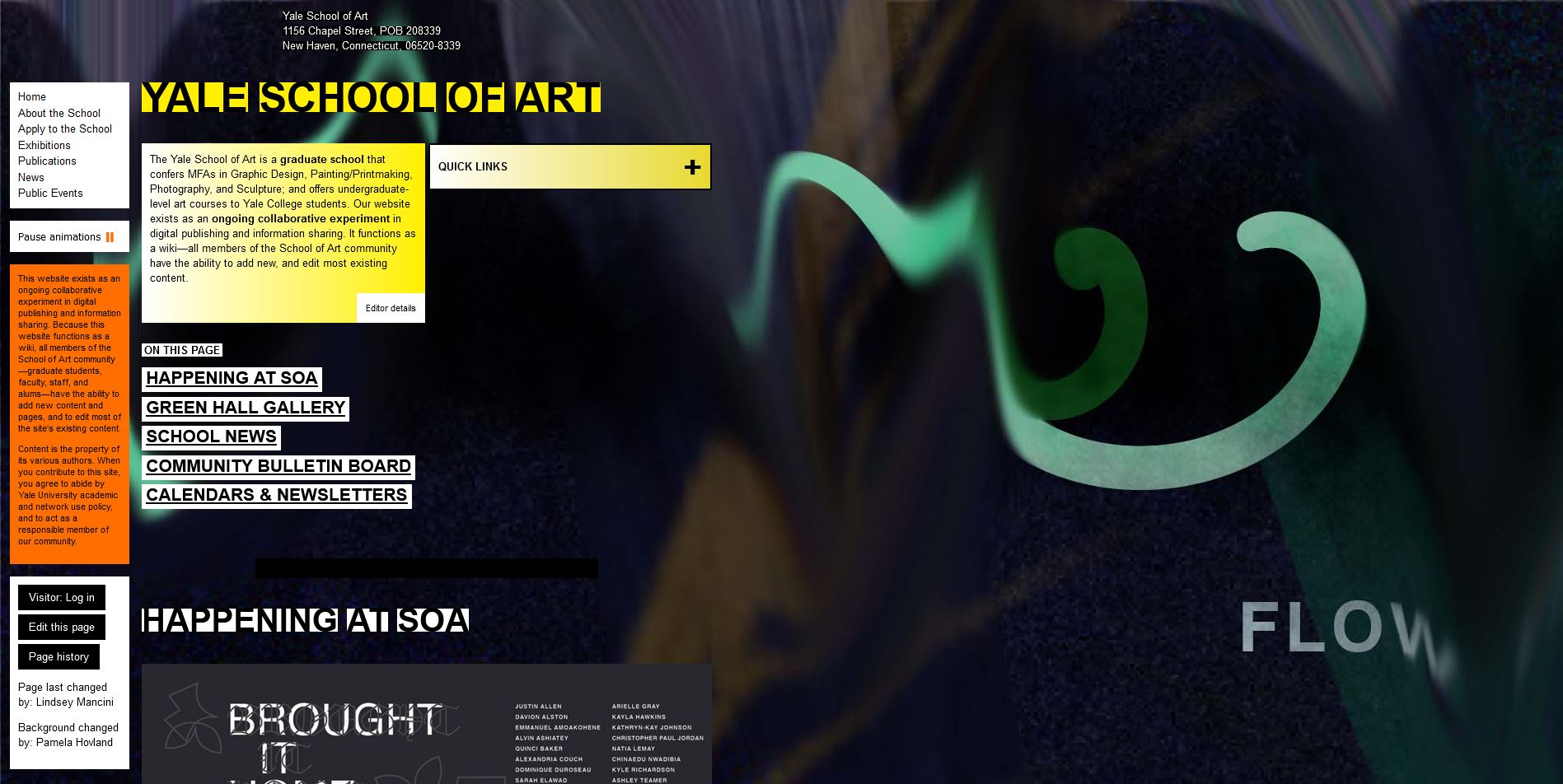
The Pitfalls of Bad Web Design
Web design plays a crucial role in how users perceive and interact with a website. A poorly designed website can drive visitors away, leading to lost opportunities and revenue. Let’s explore some common pitfalls of bad web design:
Slow Loading Times
One of the most frustrating aspects of bad web design is slow loading times. Users expect websites to load quickly, and if a site takes too long to load, they are likely to abandon it and look for alternatives.
Cluttered Layout
A cluttered layout with too much information crammed onto a page can overwhelm users and make it difficult for them to find what they are looking for. Clear navigation and well-organized content are essential for a positive user experience.
Poor Navigation
Ineffective navigation can confuse users and make it challenging for them to move around the website. Clear navigation menus, breadcrumbs, and search functionality are crucial for helping users find their way around the site.
Inconsistent Design Elements
Consistency is key in web design. Using different fonts, colors, and styles throughout a website can make it look unprofessional and disjointed. A cohesive design enhances user experience and builds brand credibility.
Lack of Mobile Optimization
In today’s mobile-centric world, failing to optimize a website for mobile devices is a major flaw in web design. Mobile-responsive design ensures that your site looks and functions well on all devices, providing a seamless user experience.
Poor Readability
If text on a website is difficult to read due to small font sizes, poor contrast, or distracting backgrounds, users are likely to lose interest quickly. Good typography choices and readability are essential for engaging visitors.
In conclusion, bad web design can have significant negative impacts on user experience, engagement, and ultimately the success of a website. By avoiding these common pitfalls and prioritizing user-centric design principles, you can create a website that attracts and retains visitors effectively.
5 Essential Tips to Avoid Common Web Design Mistakes
- Avoid cluttered layouts with too much information or elements on a page.
- Ensure easy navigation by organizing content logically and using clear menus.
- Don’t use overly bright colors or clashing color combinations that strain the eyes.
- Optimize loading times by reducing large image files and unnecessary animations.
- Make sure your website is mobile-responsive to cater to users accessing it from different devices.
Avoid cluttered layouts with too much information or elements on a page.
To improve web design quality, it is crucial to steer clear of cluttered layouts overloaded with excessive information or elements on a single page. A cluttered design overwhelms visitors, hindering their ability to navigate the site effectively and find the information they seek. By maintaining a clean and organized layout with clear hierarchy and ample white space, users can easily digest content and engage with the website in a more intuitive manner. Prioritizing simplicity and clarity in design not only enhances user experience but also contributes to a visually appealing and user-friendly website overall.
Ensure easy navigation by organizing content logically and using clear menus.
To improve user experience and avoid the pitfalls of bad web design, it is crucial to ensure easy navigation on your website. By organizing content logically and using clear menus, users can quickly find the information they are looking for without feeling overwhelmed or lost. Clear navigation enhances usability, encourages exploration, and ultimately keeps visitors engaged on your site. Prioritizing user-friendly navigation is key to creating a positive browsing experience and increasing the likelihood of achieving your website’s goals.
Don’t use overly bright colors or clashing color combinations that strain the eyes.
When it comes to web design, it’s crucial to avoid using overly bright colors or clashing color combinations that strain the eyes. Vibrant colors can be visually appealing, but when used excessively or in combination with colors that clash, they can create a jarring and uncomfortable experience for users. Opting for a harmonious color palette that is easy on the eyes not only enhances the aesthetics of a website but also promotes better readability and overall user experience. By choosing colors thoughtfully and ensuring they complement each other, web designers can create visually pleasing and user-friendly websites that engage visitors effectively.
Optimize loading times by reducing large image files and unnecessary animations.
To improve the performance of your website and enhance user experience, it is essential to optimize loading times by reducing the size of large image files and eliminating unnecessary animations. Large image files can significantly slow down a website’s loading speed, causing frustration for users and potentially leading to higher bounce rates. Similarly, excessive animations can not only distract users but also consume valuable resources, impacting overall site performance. By prioritizing efficient file optimization and minimizing unnecessary animations, you can create a faster-loading website that delivers a smoother and more enjoyable browsing experience for your visitors.
Make sure your website is mobile-responsive to cater to users accessing it from different devices.
Ensuring that your website is mobile-responsive is crucial in today’s digital landscape, where users access websites from a variety of devices. A mobile-responsive design adapts to different screen sizes and resolutions, providing a seamless and user-friendly experience across smartphones, tablets, and other mobile devices. By prioritizing mobile responsiveness in your web design, you can reach a wider audience, improve user engagement, and enhance the overall usability of your website.